New: a free VAST Tag Tester that follows every wrapper and shows every ad event
On this page 8 sections
Today we’re releasing a new free tool: the VAST Tag Tester & Validator. Paste a VAST tag address or the VAST XML itself: it follows every wrapper down to the ad, checks each step against the VAST specification, tells you in plain words what’s wrong, and plays the ad in Fluid Player with every event it reports.
It’s free, needs no account and runs in your browser.
Why we built it
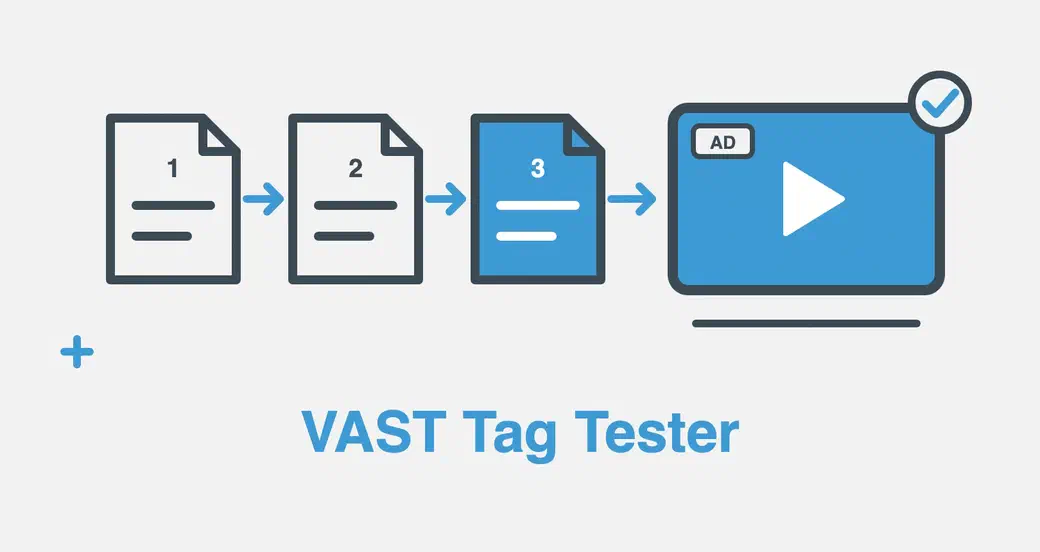
A video ad rarely comes straight from the advertiser. The tag a publisher pastes into the player usually points to an ad exchange, which points to a demand-side platform, which points to the ad itself. Each of those steps is a VAST document on a different server, and any one of them can break the chain: a server that doesn’t send CORS headers, an http:// address, a timeout, an empty answer, a malformed duration.
When that happens, the player shows nothing, or plays the video without the ad, and reports an error code at best. Online testers tend to do one of two things: play the tag in one particular player, or validate one XML document. We wanted both in one place, with every step of the chain visible and every problem explained.
Every wrapper, step by step
The tester requests your tag the way a web player does, then follows each wrapper to the next one. Each step shows whether it’s a wrapper or the ad, its ad server, its VAST version, the HTTP status and how long it took to answer. Click a step for its full address. When a step fails, the tester names it and says why: blocked by CORS, an HTTP error, no answer, a web page instead of VAST, or an empty answer.
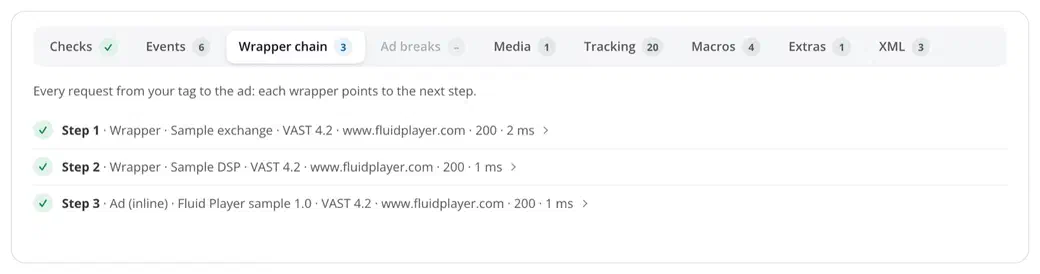
It follows the whole chain and flags what makes chains fail in real players: more wrappers than many players follow (they often stop after 3 to 5, while IAB recommends following at least 5), loops, and wrappers that forbid further wrappers or several ads.
Watch the ad play, without sending a single tracking request
The ad plays in Fluid Player, before a short sample video. Beside it, two labels sum up the test: the result (Valid, Warnings, Errors or No ad) and what the player is doing (Loading, Ad playing, Ad finished); hover the result for the diagnosis in one sentence. Under them, the figures that matter: VAST version, ad title, ad server, number of wrappers, duration, skip offset, playable media files, tracking addresses and load time.
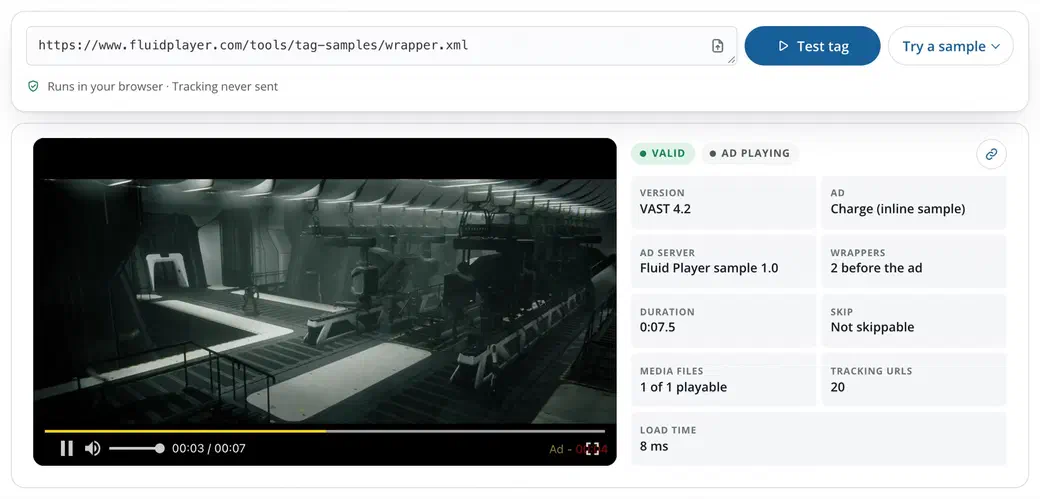
Under the player, one card holds every detail, in tabs: Checks, Events, Wrapper chain, Ad breaks, Media, Tracking, Macros, Extras and XML, each with its count. Events shows what the player reports as the ad plays: impression, start, quartiles, complete, clicks, skip, pause and mute, each with the tracking addresses behind it, gathered from every step of the chain.
Those addresses are listed, never sent. Fluid Player plays a copy of the ad in which every tracking address is replaced by a placeholder, and the page catches each one as it fires. Testing a live campaign doesn’t add fake impressions or clicks to anyone’s stats.
Every problem in plain words, with its error code
The checks follow the IAB VAST 2.0 to 4.3 and VMAP 1.0 specifications. Each problem comes as a sentence you can act on, sorted by severity (errors, warnings, notes); click it for the step it comes from and the VAST error code a player would report.
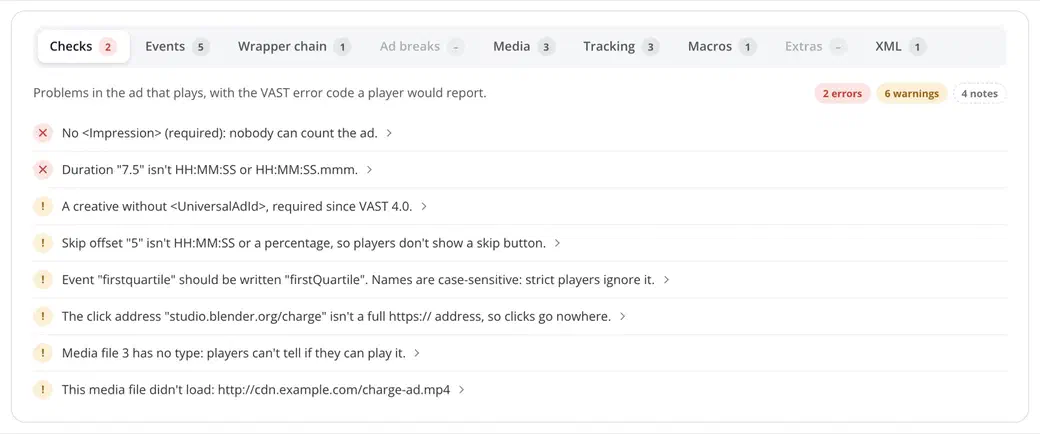
What it looks at:
- The XML: broken XML with its line and column, missing required elements (
AdSystem,AdTitle,Impression,Duration,MediaFiles, andUniversalAdIdorAdServingIdin VAST 4), times and offsets in the wrong format, misspelled event names. - Media files: type, codec, size and bitrate, whether this browser can play each one, its real picture size and length, and which one Fluid Player will play.
- Tracking and macros: every tracking address of the chain by event, standard and non-standard macros, ad-server macros left unfilled (
%%CACHEBUSTER%%,${…}), error addresses without[ERRORCODE]. - The rest: ad pods and several-ad answers, and in Extras companions, icons, Open Measurement verification, SIMID and VPAID files. Those last ones are listed but never run: the page doesn’t run third-party code.
Each error code links to our new VAST error codes reference: every code from 100 to 902, what it means, its common causes and how to fix it.
VMAP playlists too
Paste a VMAP playlist and the tester reads every ad break, resolves each break’s VAST as its own chain and plays the breaks as pre-roll, mid-roll and post-roll. Fluid Player doesn’t read VMAP itself, so the code under the tester turns the playlist’s breaks into Fluid Player ad rolls you can paste into your page.
From test to your website
For a tag address, the code to play it with Fluid Player is right under the tester, filled in with your tag. Fluid Player follows the wrappers and sends the tracking itself, with no account and no license key. The advertisements (opens in a new tab) page of the documentation has every option: mid-rolls, overlays, the skip button and the ad text.
Private by design
The tester runs in your browser. Your tag is sent only to the ad servers in it, never to us, and nothing is stored. The share button beside the result copies a link to the test: it puts the tag (or the pasted XML, compressed) after a # in the link, a part browsers never send to a server, and whoever opens it still has to click Test tag.
Six sample tags let you see it work in one click: an inline VAST 4.2 ad, a skippable ad with a companion, a chain of two wrappers, a VMAP playlist, an empty answer (error 303) and a tag full of mistakes. They’re served from fluidplayer.com, so trying them sends nothing to an ad server.
Try it
Open the VAST Tag Tester, paste a tag and click Test tag, or pick a sample.
It joins our other free tools for web video: the HLS & DASH Stream Tester, the SRT to VTT and VTT to SRT subtitle converters, and the Player Builder. Found a tag it gets wrong, or an idea for the next tool? Tell us on GitHub (opens in a new tab).